All you need is your camera!
Racing Intelligence from a GoPro Hero 9, 10, 11 or 13, or a DJI with its GPS remote. No special hardware. Nothing on the steering wheel.
 View →
 18.4°C
Clear sky
18.4°C
Clear sky
You set a solid benchmark of 47.98s on Lap 9 with a top speed of 46.9 mph. However, your consistency spread across the flying laps sits at 3.47s (ranging from 47.98s to 51.44s), which is far too wide for championship-level racing where the standard is within ±0.5s. On your best lap, you generated 1.48g lateral load in Turn 3 and matched your day's best peak cornering grip. Your overall smoothness score was 0.547 with a maximum braking effort of 0.58g in Turn 4, showing solid single-lap commitment. The main issue holding back your lap time is minimum speed location and exit execution. In Turn 6, your minimum speed of 21.0 mph occurred 7 m past the tightest point, severely delaying your exit and leaving you at only 24.0 mph on exit compared to your personal best exit of 42.7 mph on Lap 29. Telemetry detected an improving pace pattern, dropping lap times by 0.25s as tires built heat later in the stint. Try increasing tire pressure by 0.5 PSI before your next session to bring the rubber into its optimal operating window earlier. High-Speed Commitment: You matched your session-best cornering force of 1.48g in Turn 3 at 9.1s and carried strong momentum through Turn 9 with an exit speed of 46.5 mph. Braking Power: You achieved 0.58g braking deceleration into Turn 4 between 15.2s and 22.8s, demonstrating strong threshold braking. Turn 1 Momentum: Maintained an impressive minimum speed of 43.2 mph and an exit speed of 43.9 mph through the opening sweeper. In Turn 6 between 25.0s and 32.6s, you over-slowed late, hitting your minimum speed of 21.0 mph roughly 7 m after the apex. Focus on releasing the brake earlier to bring exit speed closer to your day's best of 42.7 mph. In Turn 5 between 20.8s and 26.8s, your minimum speed occurred 23 m before the tightest point at 30.7 mph. You overslowed on entry; carry more roll speed to chase your personal best exit of 44.7 mph seen on Lap 15. Adjust Pressures: Increase cold tire pressures by 0.5 PSI to get immediate grip from Lap 2 onward. Trail-Brake Release in Turn 6: Release brake pressure earlier so you do not scrub speed past the tightest point, aiming to roll on throttle before the exit curb. Carry Roll Speed into Turn 5: Delay heavy deceleration so your slowest point is not reached 23 m early on corner approach. Target Consistency: Complete 5 consecutive laps within a ±0.5s window (around 48.2s–48.7s).
Works with Hero 9, 10, 11 and 13, and DJI Action + GPS remote · Which cameras work
Racing Line
Euroindy - Kartódromo da BatalhaGPS Lap Timer
10Hz GPSSpeed
Performance Trace
Five channels. One upload.
Your action camera is already recording GPS position, accelerometer data, speed, and gyroscope orientation on every lap. Race Ninja reads it directly from the video file and gives you lap times, sector splits, racing lines on satellite imagery, and braking zone markers. Nothing to install, nothing to configure.

Your Perfect Lap
Every driver has sessions where sector 1 was nailed on lap 3, sector 2 peaked on lap 7, and sector 3 came together on lap 5. Your fastest sectors already exist. Just not in the same lap.
Your Perfect Lap stitches those sectors into a single composite video showing you the lap you're already capable of, with a theoretical time built from your real best-of-session data.
Theoretical best from session

See exactly where you gained or lost

Head-to-Head
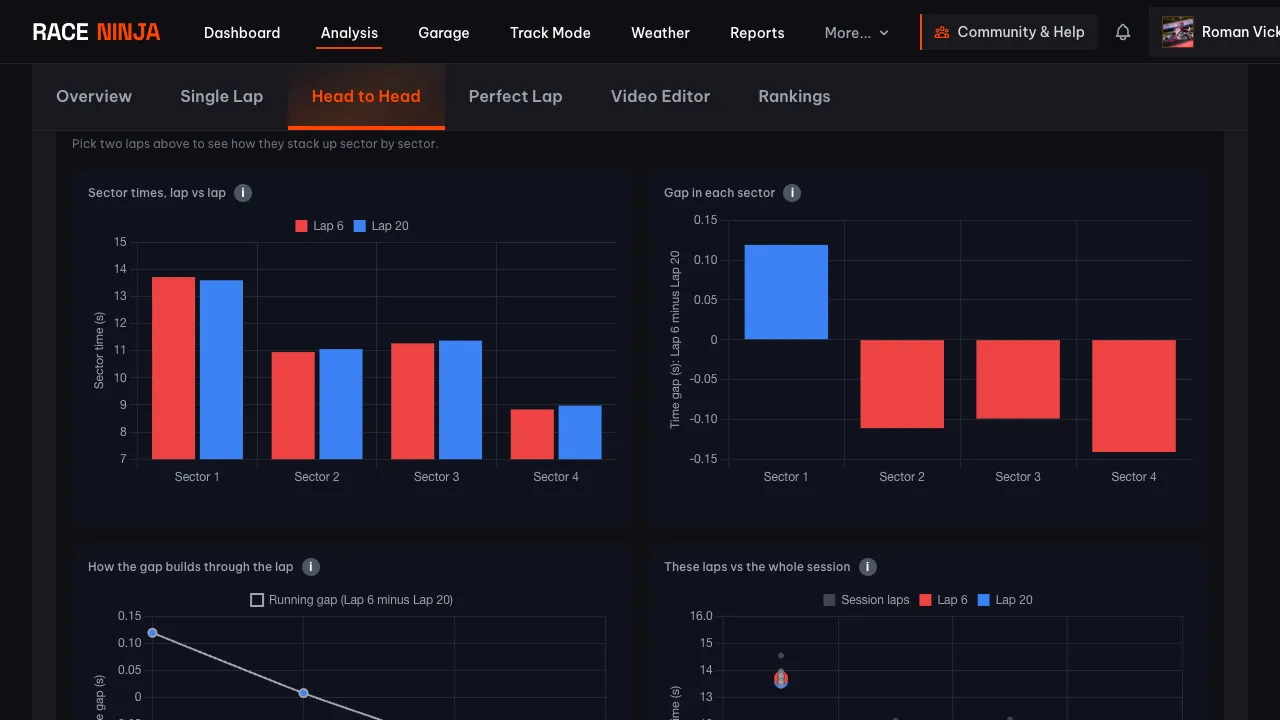
Compare two laps side by side with synchronised video and racing lines on satellite.

Sector Analysis
Colour-coded sectors, speed zones, and equipment metrics for every lap.

AI Coaching
Session summary with strengths, weaknesses, and specific setup suggestions.

Show the world what you've got
Build videos with telemetry overlays. Download an MP4 ready for Instagram, TikTok, wherever. Share when you want to. Keep private when you don't.

Compare speed, lateral g-force, longitudinal g-force, and performance traces between any two laps.
See exactly where the time goes
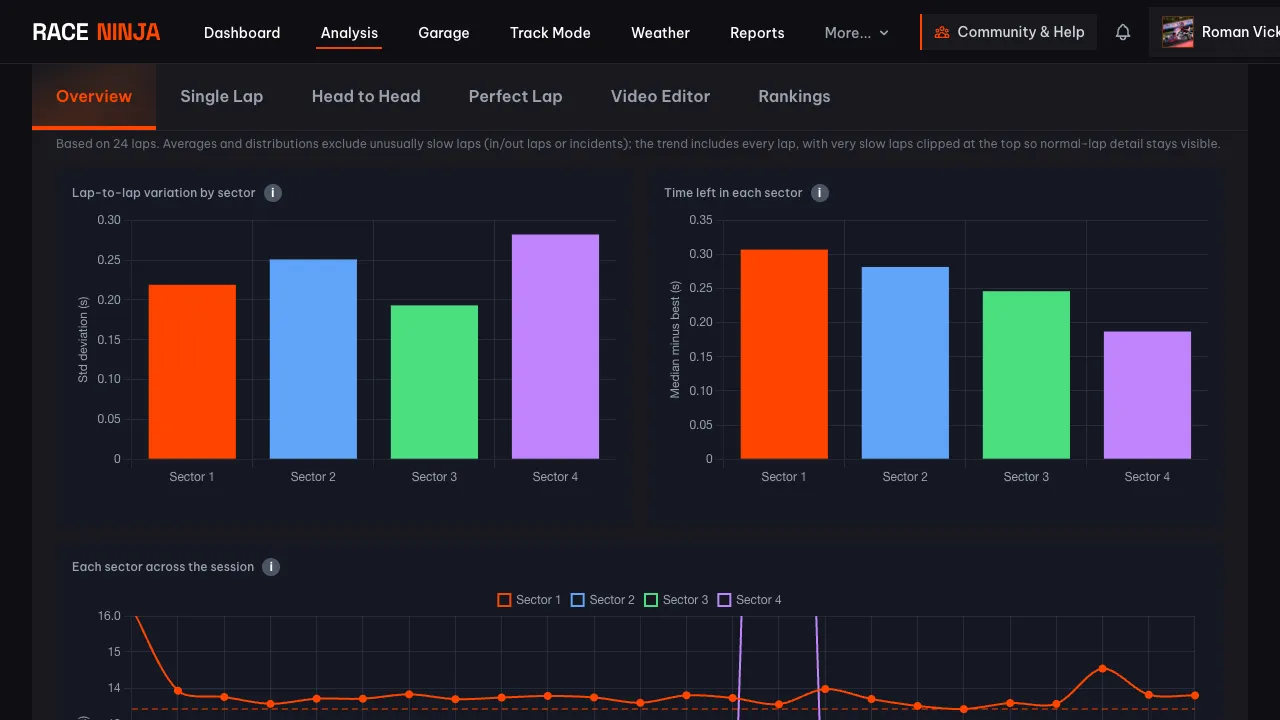
Race Ninja breaks every session down sector by sector. See which parts of the track you nail and which ones wobble, where your typical lap leaks time against your best, and how each sector trends as the session goes on. Every chart points you at what to work on next time out.
Fuse your dashboard data
Running an Alfano, AiM, or other kart dashboard? Upload your session file alongside your video and Race Ninja time-syncs them automatically. RPM, EGT, and hardware speed appear on your video overlay, matched lap by lap.
Any track. Any kart. Any car. Anywhere in the world.
Drive somewhere new, upload the footage, and Race Ninja figures out where you were. It detects the circuit, splits your laps, and builds the telemetry. No manual setup.
Works with:
Watch racers using Race Ninja on YouTube. Made one yourself? Send it in.
Racing in 44 countries
212 circuits and counting. Race somewhere new and your track gets added from your GPS data. Pick a country to see its circuits.
No track database. No setup.
Other apps make you check a list before you drive. We don't have a list. Upload your footage from any circuit, anywhere, and Race Ninja detects the track, splits your laps and builds the telemetry. Your local kart club, a track day abroad, a circuit that opened last week. It just works.
- Argentina 2
- Australia 5
- Austria 2
- Belgium 3
- Brazil 3
- Bulgaria 2
- Canada 6
- China 3
- Costa Rica 1
- Croatia 1
- Czechia 1
- Denmark 1
- Egypt 1
- France 16
- Germany 7
- Greece 1
- Guernsey 1
- Hungary 1
- India 5
- Ireland 1
- Israel 2
- Italy 10
- Japan 2
- Latvia 1
- Luxembourg 1
- Malaysia 5
- Netherlands 6
- New Zealand 1
- Panama 1
- Peru 1
- Poland 2
- Portugal 4
- Qatar 1
- Russia 2
- South Africa 2
- Spain 4
- Sri Lanka 1
- Sweden 4
- Thailand 2
- Ukraine 3
- United Arab Emirates 4
- United Kingdom 65
- United States 24
- Uzbekistan 1
Simple, honest pricing
Choose what fits how you race. No hidden fees.
Subscribe
Best for regular racers. A monthly allowance, AI coaching from Clubman up, full 1080p video and permanent hosting on Pro.
From £9.99/mo
Pay As You Go
No commitment. One analysis at 718p with coaching, weather and sector splits. Hosted for 365 days.
£1.59 per analysis
From the blog
Tips, tutorials & updates

Tag us in your next video and we'll put it on Race Ninja
Racing on YouTube? Show or mention Race Ninja in your next upload and it can land on our Featured page, with a link straight back to your channel.
2 min read

The Race Ninja app is open. Your phone carries the footage, we do the thinking
The Race Ninja app for iPhone, iPad and Apple silicon Macs is open to everyone through TestFlight. It shrinks your footage in the paddock, sends it up, and your analysis comes back in about a minute a lap.
2 min read

The data always told the story. Now Race Ninja reads it to you
Every chart on the results page now has a plain-language summary. What changed and what to do about it. No spreadsheet required.
3 min read
Your data stays yours
Every lap you upload is private the moment it lands. It isn't shared with a team. It isn't pooled into anyone else's comparison. It isn't shown to another driver. And it never will be unless you say so.
You decide what happens next. Want your coach or your squad to see a session? Share it. Want to keep a scrappy practice day to yourself? Keep it locked. The choice sits with you on every single lap, and you can change your mind whenever you like.
Your driving is your edge. We're not in the business of handing it to the people you line up against. So nothing leaves your garage on its own. Not your telemetry, not your racing line, not your times.
Private by default
No setting to hunt for. You upload, you analyse, and the data is visible to you and nobody else.
Shared only when you choose
One toggle shows a lap to your team or a rival, or puts it on a public leaderboard. Flip it back whenever you want.